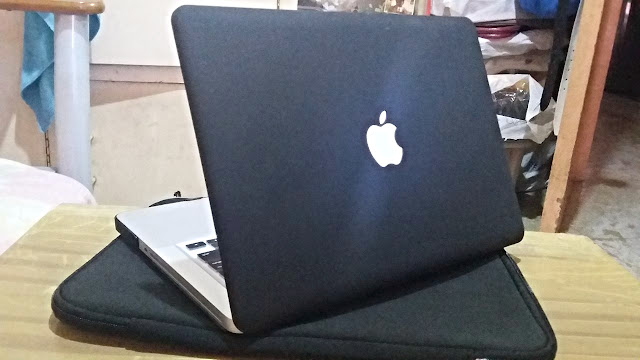
Finally! My New Personal Macbook Pro!

My New Macbook Pro - Mid 2012
So after I left the company (read: 157th Day As An iOS Developer - Adieu, My First iOS Company), I thought of buying a new macbook for myself. Since I've been planning to have a freelance job - the same role, as an iOS App Developer.

Actually I was planning to buy a second hand Macbook pro, I'll just re-format it, and clean the whole laptop, after all, it's a Mac. But my partner wouldn't let me. My partner really wanted me to buy a brand new one. Just to be safe, since it has a warranty and since it's 100% fresh from the factory. I'm here in the Philippines, so the Macbook pro mid-2012 (meaning, non-retina) costs almost $1,200.00 USD, that is P55,000.00 in Philippine Peso. I was also planning to buy a brand new one without warranty from Gray or Black Market, however I didn't and don't have cash.

There are two premium resellers of Apple here in Manila. The Power Mac and the iStudio. The Power Mac can be found in almost any mall. Like Trinoma and SM North Edsa. They accept credit cards as payment, 0% interest for 12 to 24 months. But, you have to have a Citibank Credit Card for you to have it paid in 24 months. Otherwise, you can only have it in instalment in 12 months. The same with iStudio, Citibank will grant you 24 months instalment without interest.

I bought mine from iStore. Why? There are huge benefits in buying from iStudio. When you pay in cash, the 55K will go down to 49K! See the difference! Power Mac doesn't give any discount. Also, iStudio can give you a free item if you purchase your Mac in 1 year instalment. You go check that out for yourself.

-----
Here's my story when I was installing the necessary software in my Mac:

If the pausing-resuming functionality really works in OSx (App Store), then great! I'm having a so slow internet connection and I'm downloading Xcode (Which is ~5GB in size). So I need to pause the download for a while and planning to continue the download later tonight. I hope the download won't be a failure or be corrupted.

-----

So yeah, let the software development begin! Happy coding!

FIN.


150th Day As An iOS Developer - Never Trust Your Simulator


April 13, 2016 - 150th Day As An iOS Developer

WEDNESDAY - Well I learned that you should never trust your simulator. If you use simulator, be sure to import your assets to xcassets. Assets that are outside of that xcassets can be sometimes not found when using simulator, at least in my experience in iPhone 6s+ simulator. Aside from that, I found out on Stackoverflow that your In App Purchase functionality may sometimes work fine in your simulator but if you test your app's IAP when it is already on App Store, it won't work.

I don't usually use my simulator, but using it makes your development convenient. I mean, less hassle. Less wire. Well, just like what I mentioned, I don't usually use simulator unless I really have to.

First, I hate using it because my laptop provided by the company is freakin' slow. It's a Macbook Pro Mid 2012, 4GB Ram, and has a Intel Core i5. Pretty cool, but they do not have time to format this machine and do not provide any effort to upgrade its memory. Second reason is that it does not work 100% like a real device, and as far as I know, you can't turn off its wifi functionality. Funny.

FIN.

146th Day As An iOS Developer - The Day I Had My Evaluation Exam

A Ruby Gem

April 7, 2016 - 146th Day As An iOS Developer - The Day I Had My Evaluation Exam


THURSDAY - So I made a project today. Remember I mentioned yesterday in my blog post that I will be having an evaluation exam today? I decided to have pods for easy integrating of pods, yeah Pods. Thanks to this. Updating the third party libraries is now easy. I just love pods. I learned having pods from sir P. But I think, the CTO and other senior developers do not use Pods.

I have a stuff to share, this is how you install pods in your machine. To start using pods, use these commands in your Terminal. I think my pods or ruby gems were deleted when I updated my OS to El Capitan.

$ mkdir -p $HOME/Software/ruby
$ export GEM_HOME=$HOME/Software/ruby
$ gem install cocoapods
[...]
1 gem installed
$ export PATH=$PATH:$HOME/Software/ruby/bin
$ pod --version
0.38.2

I think I will just share what happened to me today in my evaluation exam tomorrow in my next blog post (Friday). Please read it :)

FIN.

140th Day As An iOS Developer - The Super RoadBlock At Work


March 30, 2016 - 140th Day As An iOS Developer

WEDNESDAY - Super roadblock, I had today. I wasn't able to do my tasks properly because my Macbook pro has out of date operating system : Yosimite, with that being said, I couldn't run Xcode 7.2 and so I wasn't able to build any app to iOS 9.3 devices. The tasks I was doing requires those, updated OS, Xcode, and I needed to run the build in an iOS 9.3 device to reproduce the bug that the QA team found in the project I am handling.

I still didn't install my El Capitan to my machine though, I just did my task in my colleague's machine that is running on El Capitan OS. But darn, it took me a couple of hours to complete the installation of Xcode 7.2 on that machine. So yeah, super roadblock. Thanks to the management for not taking the responsibility to format the machine. Well, I think it is my responsibility.

Tomorrow, I will try to update my OS and clean up the darn Bootcamp - Annoying, ughhh! Who needs windows in a Mac?

FIN.

118th Day As An iOS Developer

February 22, 2016 - 118th Day As An iOS Developer

MONDAY - First day of 30 days under performance review of the management. Nothing much happened, I sit beside my annoying, oops, manager. Something significant happened today though in the office. Trish's macbook went crazy, it doesn't open up. The management couldn't do anything so they sent the laptop to a certain store.

----- TODO for myself: Buy a domain when 150th Day comes -----

Anyway, I think this week, I will start a new project, it's all about a passport app. Something like that. A passbook or whatever, which has a 1 week timeline. Of course I won't be able to do that without the help of a senior developer. But let's just see in the future, let's see if I will be able to finish it.

One last thing, I contacted the recruiter of PointWest today, A.K.A Ms. Dada. I asked her if they're still hiring iOS developers, and fortunately she replied: "Yes, D. Why? Are you ready to explore now or do you have referrals?". I told her that I am ready and tomorrow I am free (February 23). Then I sent her another follow up email indicating that I am also free this coming Friday. :)

FIN.

Skype Just Sucks In Every Platform


PrettyITGirl presents: My reasons why Skype application sucks in every platform.

Before anything else, can I just make a disclaimer?

DISCLAIMER: This post is not related or does not come from any company nor from any rival application of Skype. This post is merely a blog post and is here to express the author's very opinion on why the Skype sucks and should not be used as much as possible. This post is not intended to do any harm on Skype and its companies.

Alright. I'm going to give you here some of my opinions on why Skype sucks! I will try to use an alternative verb or adjective later (other than the word 'sucks'). I am currently copying a Steam in Windows, because I left my company's macbook pro at the office. I'm copying Dota2 from external drive to my local - Windows laptop! Yey! I just hope that I won't be updating my steam copy later.

Going back to the real purpose of this blog, why I hate Skype. Let me first tell you that I have already used and tried Skype application on various platforms. Name it motherlover!

1. iOS
2. Windows
3. Mac
4. Android

To enumerate the reasons, first I got this:

1. SKYPE IS EFFINGLY SLOW

I don't know if I am just exaggerating my first reason but I really find it slow, especially in Mac. Bloody Hell, Skype! You are as slow as android studio running on my Windows Laptop with an A8 AMD CPU!

2. THE WEB SKYPE VERSION SUCKS TOO

Well, we all know that this web version is in beta yet, but it still sucks! You can't sometimes receive some of the messages sent to your certain groups. Fix it, Skype!

3. SKYPE'S SOUND IS ANNOYING

At least for me, it is. Especially in iOS, when you first launch your application, the sound like a bursting rocket launcher will irritate you.

4. SECURITY AND PRIVACY IN SKYPE ARE JOKE!

Android, iOS, Windows, and Mac - Spammers are everywhere. I don't know how the Skype filters spammers, but they're always there. Freakin' spammers!

Next, one time, I was chatting with a stranger, and then I decided to block that person. Guess what? Thank you Skype! That person can still contact me until now! Thank you!

5. SKYPE IS GIVES YOU HASSLE.

Mac and Windows - In my experience in using Skype application on Mac, the application sometimes will not work and won't open up! Great! Given a random day and random time, the Skype will just not open up and crashes on Mac. Remove it from Applications Folder, reinstall, restart the computer - None of these worked. You just need to give some random time too the application for it to run.

Now in Windows, installation just takes forever. No words to describe how annoying it is! Ha!

That's all guys! Do you have any particular reasons too why you hate Skype? Share it here in comment section or contact me.